instrument panel TESLA MODEL X 2017 Owner's Guide
[x] Cancel search | Manufacturer: TESLA, Model Year: 2017, Model line: MODEL X, Model: TESLA MODEL X 2017Pages: 198, PDF Size: 4.87 MB
Page 161 of 198

Cleaning the Interior
Frequently inspect and clean the interior to maintain its appearance and to prevent
premature wear. If possible, immediately wipe up spills and remove marks. For general
cleaning, wipe interior surfaces using a soft
cloth (such as micro
fiber) dampened with a
mixture of warm water and mild non-
detergent cleaner (test all cleaners on a
concealed area before use). To avoid streaks,
dry immediately with a soft lint-free cloth.
Interior Glass
Do not scrape, or use any abrasive cleaning
fluid on glass or mirrored surfaces. This can
damage the reflective surface of the mirror
and the heating elements in the rear window.
Airbags
Do not allow any substance to enter an airbag
cover. This could
affect correct operation.
Dashboard and Plastic Surfaces
Do not polish the upper surfaces of the
dashboard. Polished surfaces are
reflectiveand could interfere with your driving view.
Leather Seats
Leather is prone to dye-transfer which can
cause discoloration, particularly on light
colored leather. White and tan leather is coated with an anti-soiling treatment. Wipespills as soon as possible using a soft cloth
moistened with warm water and non-
detergent soap. Wipe gently in a circular
motion. Then wipe dry using a soft, lint-free
cloth. Using detergents or commercially
available leather cleaners and conditioners is
not recommended because they can discolor or dry out the leather.
Polyurethane Seats
Wipe spills as soon as possible using a soft
cloth moistened with warm water and non-
detergent soap. Wipe gently in a circular
motion. For
difficult stains on ultra-white
seats, use isopropyl alcohol, then wipe with a
damp cloth. After cleaning, allow the seats to air dry.
Cloth Seats
Wipe spills as soon as possible using a soft
cloth moistened with warm water and non-
detergent soap. Wipe gently in a circular
motion. Then wipe dry using a soft, lint-free
cloth. Vacuum the seats as needed to remove
any loose dirt.
Carpets
Avoid over-wetting carpets. For heavily soiled
areas, use a diluted upholstery cleaner.
Seat Belts
Extend the belts to wipe. Do not use any type
of detergent or chemical cleaning agent.
Allow the belts to dry naturally while
extended, preferably away from direct
sunlight.
Touchscreen and Instrument Panel
Clean the touchscreen and instrument panel
using a soft lint-free cloth
specificallydesigned to clean monitors and displays. Do
not use cleaners (such as a glass cleaner) and do not use a wet wipe or a dry statically-charged cloth (such as a recently washed
microfiber). To wipe the touchscreen without
activating buttons and changing settings, you
can enable clean mode. Touch Controls > Displays > Clean Mode. The display darkens to
make it easy to see dust and smudges.
Chrome and Metal Surfaces
Polish, abrasive cleaners or hard cloths can
damage the
finish on chrome and metal
surfaces.
Cautions for Interior Cleaning
Warning: If you notice any damage on an
airbag or seat belt, contact Tesla
immediately.Warning: Do not allow any water,
cleaners, or fabric to enter a seat belt
mechanism.Caution: Using solvents (including alcohol), bleach, citrus, naphtha, orsilicone-based products or additives on
interior components can cause damage.Caution: Statically-charged materials can
cause damage to the touchscreen or
instrument panel.
Cleaning
160Model X Owner
Page 164 of 198

Removing the Maintenance Panel
To check
fluid levels, remove the maintenance
panel:
1. Pull the rear edge of the maintenance panel upward to release the
five clips that
hold the panel in place.
2. Maneuver the maintenance panel toward the windshield to remove.
Caution: The maintenance panel protects
the front trunk from water. When re-
attaching, make sure it is fully seated.
Checking Battery Coolant
If the quantity of
fluid in the cooling system
drops below the recommended level, the
instrument panel displays a warning message.
Stop Model X as soon as safety permits and
contact Tesla.
Fluid Level Check
Tesla checks the Battery coolant level at the
regularly scheduled maintenance intervals.
DO NOT ADD FLUID. Doing so can result in
damage not covered by the warranty.
Topping Up the Battery Coolant
Under no circumstances should you add
coolant. If the instrument panel warns you that
the
fluid level is low, contact Tesla
immediately.
To maximize the performance and life of the
Battery, the cooling system uses a
specifictype of G-48 ethylene-glycol coolant (HOAT).
Contact Tesla for more specific information
about the coolant.
Checking Brake FluidWarning: Contact Tesla immediately if you
notice increased movement of the brake
pedal or a
significant loss of brake fluid.Driving under these conditions can result in extended stopping distances or
complete brake failure.
The Brake indicator on the
instrument panel alerts you if the
quantity of
fluid in the brake
reservoir drops below the
recommended level. If it displays
while driving, stop as soon as safety
permits by gently applying the
brakes. Do not continue driving.
Contact Tesla immediately.
Fluid Level Check
Tesla checks the brake
fluid level at the
regularly scheduled maintenance intervals.
Topping Up the Brake Fluid
Do not top up your brake
fluid. Tesla service
does this when you bring Model X in for
regular servicing. The following instructions
are provided for information purposes and future reference only:
1. Clean the
filler cap before removing to
prevent dirt from entering the reservoir.
2. Unscrew the cap and remove.
3. Top up the reservoir to the MAX mark using brake
fluid meeting DOT3specifications.4. Replace the filler cap.
Warning: Only use new fluid from a sealed
air-tight container. Never use previously
used
fluid or fluid from a previously
opened container
Page 165 of 198

Topping Up Washer Fluid
The only reservoir into which you can add
fluid is the washer fluid reservoir located
under the front trunk. When the level is low, a
message displays on the instrument panel.
Do not use formulated washer
fluids that
contain water repellent or bug wash. These
fluids can cause streaking, smearing, and
squeaking or other noises.
Operate the washers periodically to check that
the nozzles are clear and properly directed.
To top up washer
fluid:
1. Clean the filler cap before opening to
prevent dirt from entering the reservoir.
2. Open the
filler cap.
3. Fill the reservoir until the fluid level is
visible just below the filler neck.
4. Replace the filler cap.
Note: Some national or local regulations
restrict the use of Volatile Organic
Compounds (VOCs). VOCs are commonly
used as antifreeze in washer
fluid. Use a
washer fluid with limited VOC content only if it
provides adequate freeze resistance for all climates in which you drive Model X.
Caution: Under no circumstances do you
need to inspect or top up other fluidreservoirs. Two additional fluid reservoirs
are located next to the washer fluid, but
underneath the maintenance panel. In the
unlikely event that you see a message on the instrument panel that one of these
fluid levels is low, stop Model X as soon as
safe to do so, and contact Tesla.
Caution: Do not spill washer fluid on body
panels. Doing so can cause damage. Wipe
up spills immediately and wash the
affected area with water.
Warning: In temperatures below
40
Page 182 of 198

Use a Flatbed OnlyUse a
flatbed trailer only, unless otherwisespecified by Tesla. Do not transport Model X
with the tires directly on the ground.
Caution: Damage caused by transporting is not covered by the warranty.Caution: To transport Model X, follow the
instructions exactly as described next.
Disable Self-Leveling (air
suspension vehicles only)
If Model X is equipped with Smart Air
Suspension, it automatically self-levels, even
when power is
off. To prevent damage, you
must activate Jack mode to disable self-
leveling:
1. Touch Controls > Suspension on the touchscreen.
2. Press the brake pedal, then touch Very High to maximize height.
3. Touch Jack.
When Jack mode is active,
Model X displays this indicator
light on the instrument panel,
along with a message telling you
that active suspension is
disabled.
Note: Jack mode cancels when Model X is
driven over 4.5 mph (7 km/h).
Warning: Failure to activate Jack mode on
a Model X equipped with Smart Air
Suspension can result in the vehicle
becoming loose during transport, which
may cause
significant damage.
Activate Tow Mode
Model X may automatically shift into Park
when it detects the driver leaving the vehicle,
even if it has previously been shifted into Neutral. To keep Model X in Neutral (which
disengages the parking brake), you must use
the touchscreen to activate Tow mode:
1. Shift into Park.
2. Press the brake pedal, then on the touchscreen, touch Controls > Settings >
Service & Reset > Tow Mode.When Tow mode is active, Model X
displays this indicator light on the
instrument panel, along with a
message telling you that Model X is
free-rolling.
Note: Tow mode cancels when Model X is
shifted into Park.
Caution: If the electrical system is not
working, and you therefore cannot release
the electric parking brake, attempt to
quick start the 12V battery. For
instructions, call Tesla. If a situation
occurs where you cannot disengage the
parking brake, use tire skids or transport Model X for the shortest possible distance
using wheeled dollies. Before doing so,
always check the dolly manufacturer
Page 193 of 198
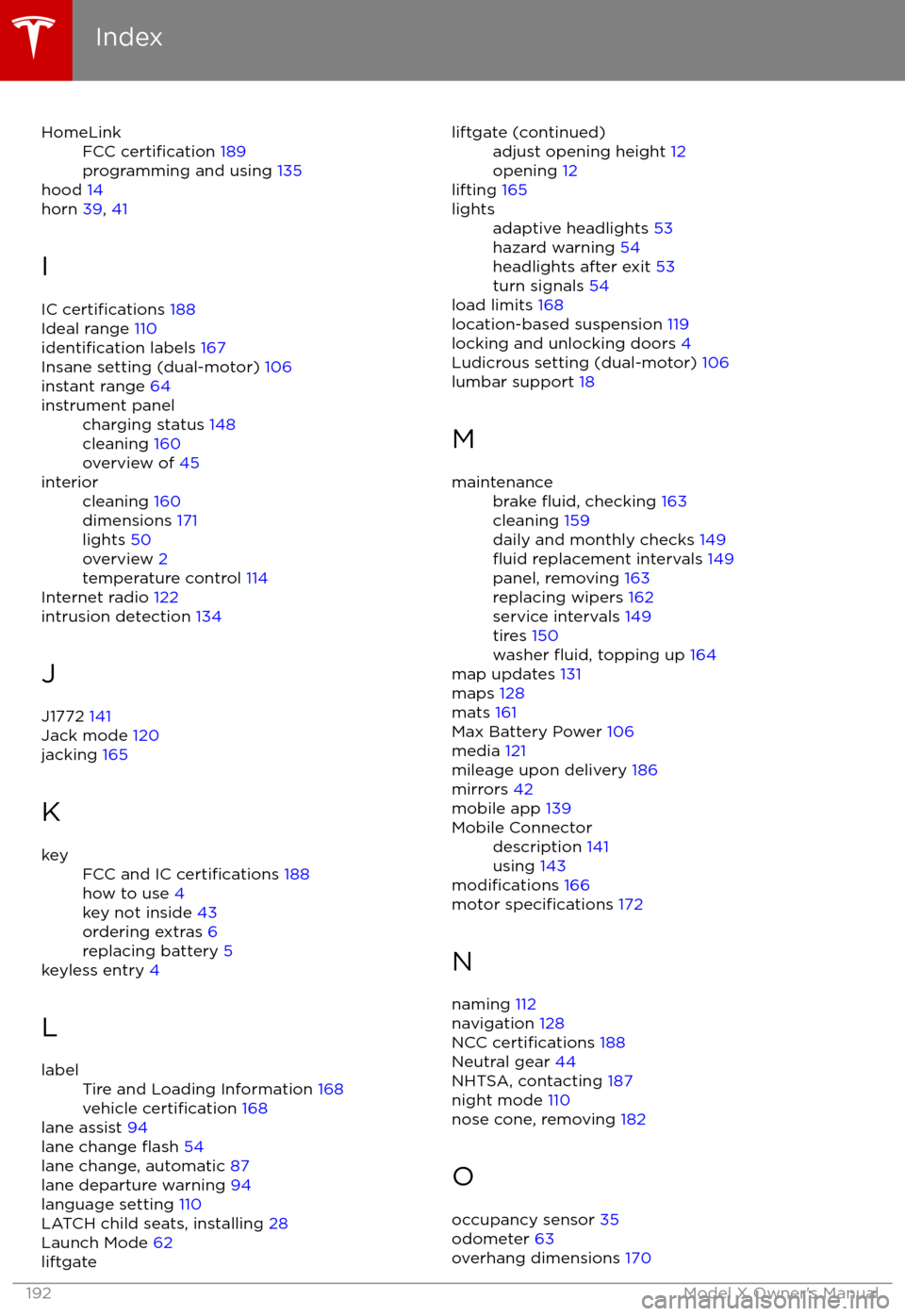
HomeLinkFCC certification 189
programming and using 135
hood 14
horn 39, 41
I
IC
certifications 188
Ideal range 110
identification labels 167
Insane setting (dual-motor) 106
instant range 64
instrument panelcharging status 148
cleaning 160
overview of 45interiorcleaning 160
dimensions 171
lights 50
overview 2
temperature control 114
Internet radio 122
intrusion detection 134
J
J1772 141
Jack mode 120
jacking 165
K
keyFCC and IC certifications 188
how to use 4
key not inside 43
ordering extras 6
replacing battery 5
keyless entry 4
L
labelTire and Loading Information 168
vehicle certification 168
lane assist 94
lane change flash 54
lane change, automatic 87
lane departure warning 94
language setting 110
LATCH child seats, installing 28
Launch Mode 62
liftgateliftgate (continued)adjust opening height 12
opening 12
lifting 165
lightsadaptive headlights 53
hazard warning 54
headlights after exit 53
turn signals 54
load limits 168
location-based suspension 119
locking and unlocking doors 4
Ludicrous setting (dual-motor) 106
lumbar support 18
M
maintenancebrake fluid, checking 163
cleaning 159
daily and monthly checks 149
fluid replacement intervals 149
panel, removing 163
replacing wipers 162
service intervals 149
tires 150
washer
fluid, topping up 164
map updates 131
maps 128
mats 161
Max Battery Power 106
media 121
mileage upon delivery 186
mirrors 42
mobile app 139
Mobile Connectordescription 141
using 143
modifications 166
motor specifications 172
N naming 112
navigation 128
NCC
certifications 188
Neutral gear 44
NHTSA, contacting 187
night mode 110
nose cone, removing 182
O occupancy sensor 35
odometer 63
overhang dimensions 170
Index
192Model X Owner
Page 194 of 198

overtake acceleration 78
Owner Information, about 184, 185
P Park Assist 59
Park gear 44
parking brake 57
parking, automatic 89
parts replacement 166
passenger detection 35
passenger front airbag 35
personal data, erasing 113phonesteering wheel buttons 40
using 126
PIN 37
power management 64
power socket 125
power windows 11
powering on and
off 43
Preconditioning 110
preferences, setting 110
Proposition 65 186
public charging stations 141
R radar 76
radio 121
Radio Frequency information 188
rain sensor 55
rangedisplayed on instrument panel 45
driving tips to maximize 64
regenerative braking 57
range assurance 64
Range mode 64
Range Mode 106
Rated range 110
re-routing 129
rear seats, accessing 20
rear view camera 66
rear window switches, disabling 11
Recent (Media Player) 123
Recents 128
regenerative braking 57
region format 110
release notes 138
Reverse gear 44
RFID transponders 166
roadside assistance 180
rotating tires 151
route overview 129
S
safety defects, reporting 187safety informationairbags 36
child seats 32
seat belts 24
satellite radio 122
seat beltscleaning 160
in a collision 23
overview of 22
pre-tensioners 23
wearing when pregnant 22
seat covers 21
seat heaters 114
seating capacity 168
seatsadjusting 18
heaters 114
seats, second row 19
security settings 134
sensors 76
service data recording 186
service intervals 149
Settings 110
Settings, erasing 113
shifting gears 44
Show Commute Advice 129
side collision avoidance 94
side collision warning 94
SiriusXM 122
slip start 58
Smart Preconditioning 110
software reset 113
software updates 138
specificationsdimensions 170
exterior 170
interior 171
motor 172
subsystems 172
tires 175
weights 171
wheels 175
spoiler 67
stability control 58
starting 43
steering
specifications 172
steering wheeladjusting position 39
adjusting sensitivity 39
buttons 39
heated 39
scroll bars 39
steering, automatic 84
Streaming radio 122
summer tires 152
Summon 89
Index
Index193